
How to Opt Out of Amazon’s Ships in Product Packaging (SIPP) Program
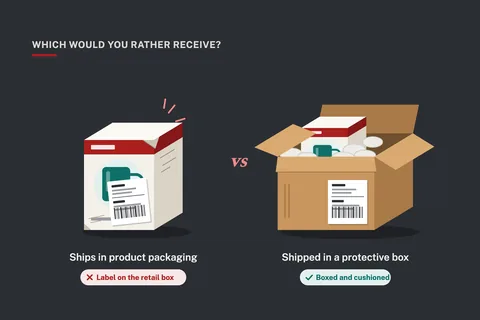
We were building a new FBA shipment when something we’d never seen before showed up. Two of our products were marked to ship to customers in their own product packaging. No Amazon box and no padding, just a shipping label stuck right on the retail box.
Amazon calls this the Ships in Product Packaging program, or SIPP. Plenty of sellers are enrolled and don’t know it. When we looked into it, we found our two products had been enrolled automatically, and the enrollment dates were more than a year old. Here’s what SIPP is, why we decided to opt out, and exactly how to do it.
What Is Ships in Product Packaging?
Normally, when a customer orders an FBA product, Amazon packs it in a box or mailer, adds packing material if it needs it, and ships it. With Ships in Product Packaging, Amazon skips that step. The product goes out the door in the packaging it came in, with the shipping label applied directly to it.
SIPP builds on Amazon’s earlier packaging certification programs, like Frustration-Free Packaging and Ships in Own Container (SIOC). The idea is simple:
- Less waste. No extra box, no plastic mailer, no air pillows.
- A small fee discount. Certified products get a discount on FBA fulfillment fees. It depends on the size tier and weight, and for small items it can be just a few cents per unit.
- Faster handling for Amazon, because there’s no overbox to pack.
For the right product, it makes sense. A heavy item that already comes in a sturdy corrugated carton may ship just fine on its own.
You May Be Enrolled Without Knowing It
Here’s the part that caught us off guard. You don’t have to sign up for SIPP to end up in it. Amazon can enroll products on its own when it decides they’re suitable, and it doesn’t always make a point of telling you.
We only found out because the shipment workflow flagged two of our products as shipping in product packaging. That was the first time we’d ever seen it. When we looked them up in the SIPP portal, the enrollment dates were more than a year back. That means for over a year, some of our customers may have been receiving our products with a shipping label on the retail box.
Check your whole catalog. Don’t stop at the products that get flagged in a shipment. If two of ours had been enrolled for over a year without our noticing, others could be too.
Why We Opted Out
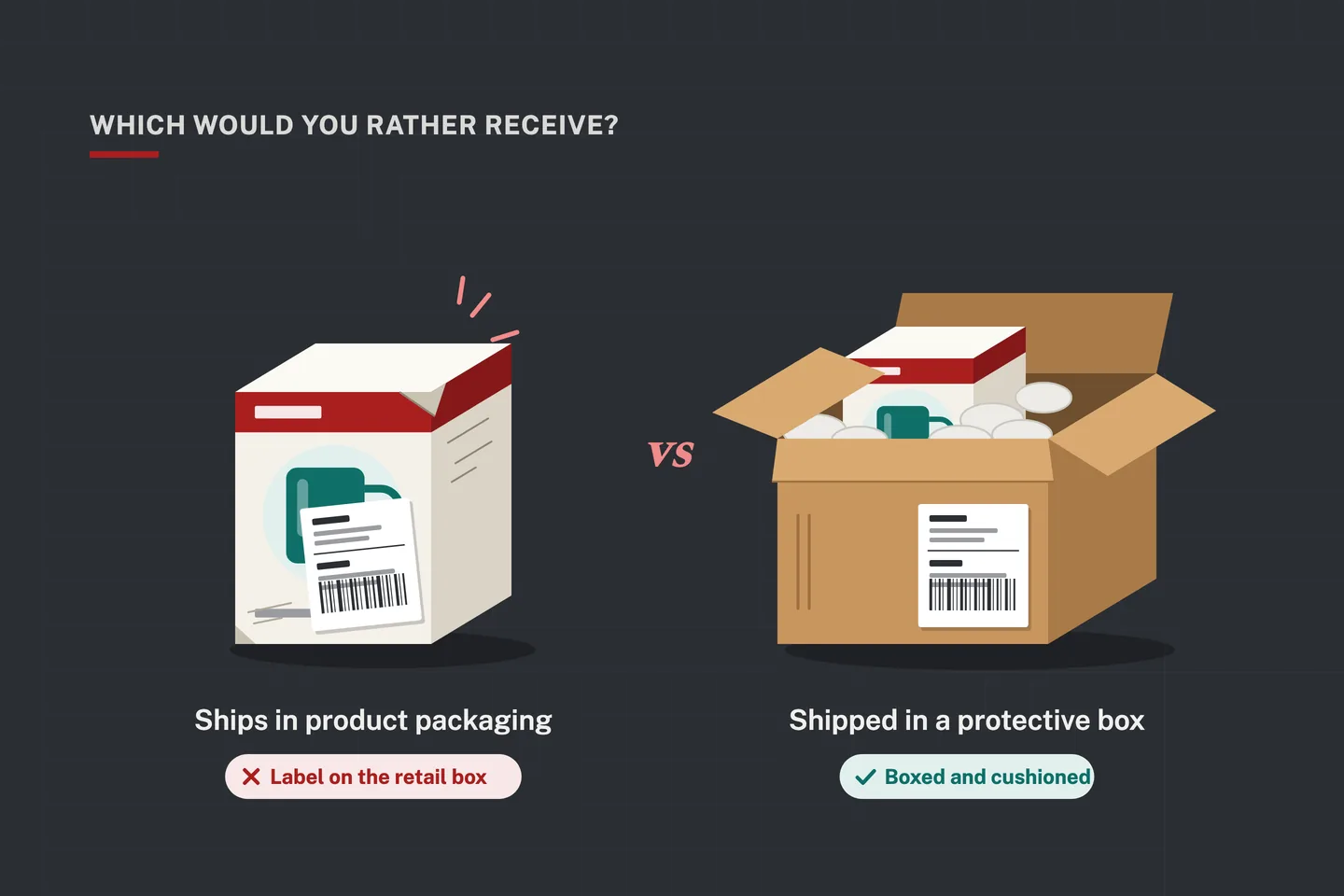
A few cents in savings wasn’t worth what we stood to lose. Our retail packaging is designed to look good and to protect the product inside a shipping box. It isn’t designed to survive a trip through a delivery network on its own. We want our products better protected, and here’s what can go wrong when they ship in their own packaging:
- Damage in transit. Retail boxes get crushed, dented, scuffed, and torn. A damaged box can turn into a return, a refund, or a one-star review that says “arrived damaged” or “looked used.”
- A label on your branding. The shipping label goes right on your packaging, often covering the artwork you paid to design. That’s a poor first impression for your brand.
- Spoiled gifts. When a product ships in its own box, everyone can see what’s inside, including the person it’s supposed to surprise.
- A tempting target on the porch. A package that shows exactly what’s inside is easier pickings for porch thieves than a plain brown box.
- Returns you can’t resell. A product that comes back in a beat-up box often can’t be sold as new again.
One damage-related return can wipe out the fee discount on hundreds of units. For our products, it wasn’t close.
How to Opt Out of Ships in Product Packaging
You can unenroll a product from SIPP yourself in Seller Central. It takes about a minute per product.
- Open the SIPP program portal. Log in to Seller Central and search for “Ships in Product Packaging.” You can also find it under the Programs or Sustainability sections of the menu.
- Go to the Enrolled Products tab. It lists every product currently certified or enrolled in SIPP. While you’re there, take a look at the enrollment dates.
- Find your product. Use the search to look up the ASIN or SKU and locate it in the list.
- Click Unenroll. You’ll find it in the Action column next to the product.
- Confirm the unenrollment. Amazon will remove the product from the SIPP program.
Repeat these steps for each product you want out of the program.
What to Expect After You Opt Out
Amazon says it can take up to 72 hours to process the request. Until then, the product may still show as enrolled, so don’t worry if nothing changes right away.
- Wait the full 72 hours, then check the Enrolled Products tab to confirm the product is no longer listed.
- If you’re in the middle of creating a shipment, check the product again in the shipment workflow before you finish.
- If a product still shows as enrolled after 72 hours, open a case with Seller Support and include the ASIN and the date you unenrolled.
- Set a reminder to review the Enrolled Products tab every few months, so a new enrollment doesn’t go unnoticed for a year.
When SIPP Might Still Make Sense
SIPP isn’t wrong for every product. If you sell something heavy or bulky that already ships in a sturdy brown carton, with no retail graphics to protect, the fee discount and the reduced waste can be worth it. Some customers appreciate less packaging, too.
The point is that it should be your decision, product by product. Ask yourself two questions: Would this package still look good after a few days in delivery trucks? Would I be happy to find it on my doorstep this way? If the answer to either one is no, opt out.
For more on getting your inventory to Amazon in good shape, see Pillar 5: Succeeding with Logistics and five mistakes to avoid when using FBA.
The Bottom Line
Packaging is part of your product. It’s the first thing your customer touches, and it often decides whether they’re delighted or disappointed. Take five minutes today to open the SIPP portal and look at your Enrolled Products tab. You might be surprised at what you find. We were.
Keep reading
-
 Avoid These 5 Mistakes When Using FBA (Fulfillment by Amazon)
Selling on Amazon outshines other seller marketplaces such as eBay and Etsy because of Amazon’s incredible fulfillment network of warehouses. Amazon lets third-party…
Avoid These 5 Mistakes When Using FBA (Fulfillment by Amazon)
Selling on Amazon outshines other seller marketplaces such as eBay and Etsy because of Amazon’s incredible fulfillment network of warehouses. Amazon lets third-party…
-
 6 Steps to Increase Sales with Amazon Fulfillment
Shhhh! Let’s get it right out in the open. No more suspense. What is the secret that can transform your business without having to hire a bunch of staff or manage the…
6 Steps to Increase Sales with Amazon Fulfillment
Shhhh! Let’s get it right out in the open. No more suspense. What is the secret that can transform your business without having to hire a bunch of staff or manage the…
-
 Tips for Getting Shipping Supplies for Your Amazon Business
When I was first starting out, I’d get boxes from OfficeMax, and they were expensive! There’s a better way to save on shipping. If you use Fulfillment by Amazon (which…
Tips for Getting Shipping Supplies for Your Amazon Business
When I was first starting out, I’d get boxes from OfficeMax, and they were expensive! There’s a better way to save on shipping. If you use Fulfillment by Amazon (which…