
Claude AI for Amazon Sellers: 12 Ways to Save Hours and Sell More
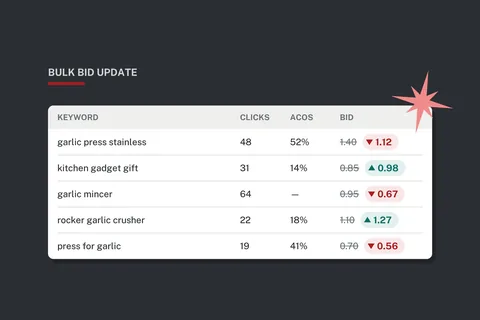
Running an Amazon business means living in spreadsheets. Ad reports, search term reports, keyword exports, inventory reports, fee reports. The data that could grow your business is all there. The hours to dig through it usually aren’t.
That’s where Claude comes in. Claude is an AI assistant from Anthropic, and it’s very good at the exact kind of work that eats up a seller’s week: reading big spreadsheets, spotting patterns, doing the math, and writing clear copy.
This isn’t about asking a chatbot for “10 tips to sell more.” It’s about handing Claude your real reports and getting back finished work: a bid file ready to upload, a rewritten listing, a list of product ideas worth testing. Here are 12 practical ways to put it to work, starting with the one that can save you the most time.
Before You Start: Give Claude Real Data
Claude doesn’t log in to Seller Central, and it doesn’t have Amazon’s sales data. What it does have is the ability to read the files you give it. That’s the secret to getting useful answers instead of generic ones.
- Upload the actual file. Claude reads CSV and Excel files directly, runs the calculations, and can hand you back a finished spreadsheet to download.
- Tell it your numbers. Your margins, your break-even ACoS, your lead times. The more context you give, the better the answer.
- Ask it to show its work. A summary of what changed and why makes every answer easy to check.
The free plan is fine for trying things out. If you’re going to work with large reports every week, a paid plan gives you a lot more room.
1. Turn Ad Reports into Bulk Bid Changes in Minutes
If you sell more than a handful of products, you know this pain. You download the advertising report, scroll through hundreds (or thousands) of keywords, decide which bids go up and which go down, then make the changes one at a time in Campaign Manager. It takes hours, so it doesn’t get done as often as it should. Meanwhile, bad keywords keep burning money and good ones stay starved.
Amazon already gives you the shortcut: bulk operations. You can download all your campaigns as a spreadsheet, edit it, and upload it back. The hard part has always been the editing. Claude does that part for you.
Here’s How It Works
- Download your bulk file. In the Amazon Ads console, go to Bulk operations and create a spreadsheet for download. Pick a date range with enough data to judge, usually 30 to 60 days.
- Upload it to Claude and ask it to explain the file back to you. This quick check confirms Claude understands which rows are campaigns, ad groups, keywords, and product targets, and which columns hold the bid and the performance data.
- Give it your rules. Be specific about your targets, how much data a keyword needs before you judge it, and how far a bid is allowed to move in one step.
- Ask for an upload-ready file and a change log. Claude changes only the bids that meet your rules, marks those rows for update, and lists every change with the old bid, the new bid, and the reason.
- Review, then upload. Skim the change log, spot-check a few rows, and upload the file in Bulk operations. Check the upload results for any errors.
Here’s an example of the kind of instructions that get great results:
Attached is my Sponsored Products bulk file for the last 60 days. My break-even ACoS is 35% and my target ACoS is 25%.
For every keyword and product target with at least 15 clicks: if ACoS is above 35%, lower the bid by 20%. If ACoS is under 20% with at least 2 orders, raise the bid by 15%. If it has 20 or more clicks and no orders, lower the bid by 30%. Never set a bid below $0.20 or above $3.00. Don’t touch anything with fewer than 15 clicks.
Only change the bid column, and set the Operation column to “Update” on the rows you change. Give me back the file ready to upload, plus a separate tab listing every change, the old bid, the new bid, and why.
Prefer a formula? Ask Claude to use a classic one: new bid = average cost per click × (target ACoS ÷ actual ACoS). It pulls each bid toward your target in proportion to how far off it is.
Work that used to take an afternoon now takes about 15 minutes, and most of that is your review. That means you can do it every week instead of every few months, and that consistency is where the real savings show up.
- Keep a copy of the original file before you upload anything.
- Start with one campaign or one product line until you trust the process.
- Limit how far any bid can move in one round. Small, regular adjustments beat big swings.
- Save your rules so you can reuse the exact same instructions next week (more on that below).
2. Find the Winners and the Money Pits in Your Search Term Report
Your search term report shows what shoppers actually typed before they clicked your ad. It’s one of the most valuable reports Amazon gives you, and one of the most ignored, because it can run to thousands of rows.
Upload it to Claude and ask for two lists:
- Money pits: search terms that keep getting clicks but never convert. These become negative keywords so you stop paying for them.
- Hidden winners: search terms that convert well but that you aren’t targeting directly yet. These become new exact-match keywords, often with a lower cost and a better ACoS.
Claude can also group the terms into themes, so you can see at a glance that, say, shoppers searching for “gift” convert twice as well as everyone else. That insight might change your images and your title, not just your ads. And just like with bids, Claude can format the new keywords and negatives as rows ready for your bulk file.
3. Rewrite Your Listings Around the Keywords That Actually Convert
A great listing does two jobs: it gets found, and it gets bought. Claude can help with both, as long as you give it real keyword data.
Good sources include a keyword export from Helium 10 or SmartScout, your own search term report, and, if you’re brand registered, the Search Query Performance dashboard in Brand Analytics. That last one is gold, because it shows which searches lead shoppers to your products and where they drop off.
Give Claude the keyword data, your current listing, and the facts about your product, then ask it to:
- Rank the keywords by relevance and search volume, and flag any important ones missing from your listing.
- Rewrite your title so the most important keywords come first and it still reads naturally to a person.
- Rewrite your bullets to lead with benefits and answer the questions shoppers actually have. (See how to write bullet points that sell.)
- Build your backend search terms from the leftovers, with no repeats, kept under Amazon’s 250-byte limit.
One rule here: Claude should only use facts you give it. If your product isn’t waterproof, don’t let “waterproof” slip into a bullet because it’s a popular keyword. Ask Claude to check each claim against your product details before you publish.
Managing a big catalog? Claude can work from a category listing report or a listing template too, and update many listings in one pass, so you can review and upload changes in bulk instead of editing them one by one.
4. Read Thousands of Reviews in Minutes
Your customers are telling you exactly what to fix and exactly what to say. So are your competitors’ customers. The problem is that nobody has time to read 2,000 reviews.
Copy reviews from your listings and your top competitors’ listings into Claude and ask it to sort them into themes:
- Top complaints, ranked by how often they come up. These are your product improvement list, and the competitors’ complaints are your opportunity.
- Top praise, in the customers’ own words. These phrases often make the best bullet points and image callouts.
- Unanswered questions and doubts that kept people from buying with confidence. Answer them in your listing before shoppers have to ask.
The FBA customer returns report is worth adding too. The return reasons and customer comments in it often point straight at a sizing chart that needs work, an instruction card that’s missing, or a photo that sets the wrong expectation.
5. Find and Pressure-Test New Product Niches
Choosing the right product is the biggest decision you’ll make, which is why Pillar 2 is all about it. Claude can make the research faster and the decision more disciplined.
Claude doesn’t know today’s Amazon sales numbers, so feed it the data. Export a product or niche report from your research tool, then ask Claude to score each opportunity against your own criteria, for example:
- Monthly revenue in the niche, and how much of it the top three sellers control
- Number of reviews you’d need to compete
- Price point, size, and weight (which drive your fees and your margin)
- Seasonality, and whether demand is growing or shrinking
- Recurring complaints about current products that you could fix
Then use Claude as a sparring partner. Ask it to argue against your favorite idea. What could go wrong? What would a big brand do if you succeeded? What would your margin look like after fees, ads, and returns? A product idea that survives a tough cross-examination is a lot more likely to survive the real market.
Claude is also great at brainstorming adjacent ideas: accessories, bundles, and variations of products you already sell well, where you already have customers, reviews, and know-how.
6. Build a Website for Your Products
Every brand needs a home outside of Amazon. A simple product website builds trust, gives you a place to send social media and email traffic, and protects you if anything ever goes wrong with your Amazon account.
You don’t need to hire a developer anymore. Describe your brand and your products to Claude, share your product details and photos, and ask it to build a site. Claude can create a working web page you can preview right in the chat, then refine it as you go: “make the header darker,” “add a FAQ section,” “add a ‘Buy on Amazon’ button to each product.” When you’re happy with it, you can publish it to a simple host. If you’d rather run your site on WordPress, Claude can write the copy and walk you through it. (See how to set up a website to showcase your branded products.)
Here’s a tip a lot of sellers miss: if you’re brand registered, put Amazon Attribution tracking links on your “Buy on Amazon” buttons. You’ll see exactly how many sales your website drives, and through the Brand Referral Bonus program, Amazon pays you a bonus on qualifying sales that come from outside traffic. Your website can actually lower your selling costs.
7. Know Your True Profit for Every Product
Plenty of sellers know their revenue. Far fewer know their real profit for each product after referral fees, FBA fees, storage, ad spend, returns, and the cost of the product itself. That’s how a “best seller” quietly loses money for months. (More on this in gross vs. net profit.)
Download your payments or settlement report and your advertising spend by product, add a simple sheet with your landed cost per unit, and hand it all to Claude. Ask for a profit-and-loss breakdown by product, sorted from most to least profitable, with net margin and profit per unit.
The results are often surprising. Then ask the follow-up questions: Which products should get more ad budget? Which need a price increase? Which should you stop reordering?
8. Plan Inventory Before It Becomes a Problem
Run out of stock and you lose sales and ranking. Overstock and you pay for storage, aged inventory surcharges (which start at 181 days), and tied-up cash. Getting it right takes math most of us don’t enjoy.
Give Claude your inventory and sales history, plus your supplier lead times and shipping times, and ask it to calculate for each product:
- Average daily sales, and the trend over the last few months
- Days of inventory left
- A reorder point and a suggested order quantity, with a safety buffer
- Products at risk of hitting aged inventory fees
Ask it to account for seasonal swings, like a holiday spike, and to stay within your FBA capacity limits. (See how to work with FBA capacity limits.) You’ll end up with a reorder plan you can follow, instead of guesswork.
9. Talk to Suppliers Like a Pro
Clear communication with suppliers saves money and prevents expensive mistakes. Claude can help you:
- Write a clear request for quote with exact specifications, materials, packaging, and labeling requirements.
- Compare quotes side by side, including the costs that are easy to miss, like tooling, samples, and shipping terms.
- Translate messages into your supplier’s language, and translate replies back, in simple, unambiguous wording.
- Create a quality inspection checklist for your product so nothing gets missed before it ships.
- Prepare for a negotiation by role-playing it first.
For more on working with overseas factories, see sourcing products from China and why you should always verify and inspect.
10. Plan Images and A+ Content That Sell
Pictures sell products. Most shoppers look at your images long before they read a word of your listing. Claude can’t take your product photos for you, but it can make sure every image has a job.
Give Claude your listing, your keyword research, and the review themes from earlier, then ask it to plan your full image stack: the main image, a benefits infographic, a size and dimensions image, lifestyle shots, a comparison chart, and what’s in the box. Ask for a written brief for each one that you can hand straight to a photographer or designer.
Do the same for your A+ Content. Claude can suggest which modules to use, write the copy for each one, and make sure your story flows from top to bottom. You can also upload screenshots of your current images and ask for a candid critique, especially how they look on a small phone screen.
11. Write Clearer Cases, Appeals, and Reimbursement Claims
Few things are more stressful than a suppressed listing, a policy warning, or an account health issue. When you need to write to Amazon, a calm, clear, well-organized message makes a real difference.
Paste in the notice you received and the facts of your situation, and Claude will help you understand what Amazon is actually asking for and write a response that addresses it point by point. For appeals, it can help you structure a plan of action around what happened, the root cause, what you’ve already fixed, and what you’re doing to make sure it doesn’t happen again.
The same goes for FBA reimbursement claims for lost or damaged inventory. Claude can compare your shipment records against what Amazon received and help you lay out the discrepancy clearly.
Facts only. Never let Claude add anything to a case or appeal that isn’t true, and read every word before you send it. Your account is on the line, and it’s your name on the message.
12. Take Your Listings International
Expanding to Amazon Canada, Mexico, the UK, or Europe can open up a whole new set of customers for products that are already working. Language is often what holds sellers back.
Claude translates far better than a word-for-word tool, and it can localize, not just translate. That means metric measurements, local spelling (“colour,” not “color,” for the UK), local sizing, and the words shoppers in that country actually search for. Ask it to adapt your title, bullets, description, and backend search terms for each marketplace.
Before a big launch, it’s still worth having a native speaker give it a final read. But Claude gets you most of the way there in minutes.
Bonus: Turn It into a System with Projects
The real power comes when you stop starting from scratch. In Claude, a Project holds your reference files and standing instructions, so every conversation already knows your business.
Set one up for your Amazon business and add:
- Your brand voice and a few listings you love
- Product specs, landed costs, and margins for your catalog
- Your advertising rules, like target ACoS, bid limits, and minimum clicks
- Amazon’s style guidelines for your categories
Now your weekly bid update is a two-minute job: upload the new bulk file and say, “Run this week’s bid update.” Every listing Claude writes already sounds like your brand. That’s how a helpful tool becomes a dependable part of your business.
Quick Reference: What to Give Claude and What You Get Back
| Task | What to give Claude | What you get back |
|---|---|---|
| Bid changes | Ads bulk file, target and break-even ACoS, bid rules | Upload-ready bulk file and a change log |
| Search term cleanup | Search term report | Negative keywords and new keywords to target |
| Listing updates | Keyword export, current listing, product facts | New title, bullets, and backend search terms |
| Review insights | Your reviews, competitor reviews, returns report | Ranked complaints, praise, and listing fixes |
| Product research | Niche or product export from your research tool | Scored opportunities and a tough second opinion |
| Product website | Brand story, product details, photos | A working site you can preview and refine |
| Profit by product | Payments report, ad spend, landed costs | Profit and margin for every product |
| Inventory planning | Inventory and sales history, lead times | Reorder points and order quantities |
Use It Wisely
Claude is a powerful assistant, but you’re still the one running the business. A few ground rules keep you safe:
- Protect customer data. Amazon’s rules strictly limit what you can do with customer information. Remove names, addresses, phone numbers, and emails before you upload any order report. You rarely need them for analysis anyway.
- Check the numbers. Ask Claude to show its work, and spot-check a few rows before you act on any file. If something looks off, ask it to explain.
- Stay within Amazon’s policies. Never use AI to write fake reviews, and don’t make claims about your product that you can’t back up.
- Start small. Test any new process on one product or one campaign before you roll it out to your whole catalog.
Start This Week
Don’t try to do all 12 at once. Pick the task you dread most, the one that keeps getting pushed to “next week.” For most sellers, that’s the ad bids.
Download your bulk file, upload it to Claude, and give it your rules. Once you’ve seen a few hours of work turn into a few minutes, you’ll start finding uses of your own. The sellers who win aren’t the ones working the longest hours. They’re the ones spending their hours on the decisions that matter.
Keep reading
-
 What Is SmartScout and How Can It Help Amazon Sellers?
SmartScout helps Amazon sellers take control of their Amazon strategy. It is the premier tool for competitive intelligence, market trends, and making use of Amazon data…
What Is SmartScout and How Can It Help Amazon Sellers?
SmartScout helps Amazon sellers take control of their Amazon strategy. It is the premier tool for competitive intelligence, market trends, and making use of Amazon data…
-
 Optimize Your Amazon Listing: 10 Powerful Search & Keyword Strategies
Asteroid Aim has published a great video for optimizing your Amazon product listing for better keyword selection and search results on Amazon. What’s great about the…
Optimize Your Amazon Listing: 10 Powerful Search & Keyword Strategies
Asteroid Aim has published a great video for optimizing your Amazon product listing for better keyword selection and search results on Amazon. What’s great about the…
-
 Warning: Most Amazon Sellers Miss Out on Real Profits
The Story… Bob sells dishware online. He sells on Amazon and on his own website. His sales are over $250,000, and he feels that things are going great. What Bob doesn’t…
Warning: Most Amazon Sellers Miss Out on Real Profits
The Story… Bob sells dishware online. He sells on Amazon and on his own website. His sales are over $250,000, and he feels that things are going great. What Bob doesn’t…